

Appetite and energy, not just the scale
On a GLP-1 the scale is only part of the story. Rate appetite, energy, sleep quality and recovery from 1 to 5, each with a plain-language label, and see them move together with your weight and waist.
Progress & check-ins
Log weight, waist, sleep, energy and appetite, describe symptoms in your own words and keep private progress photos. Every check-in on one chart.
A personal journal, not medical advice.
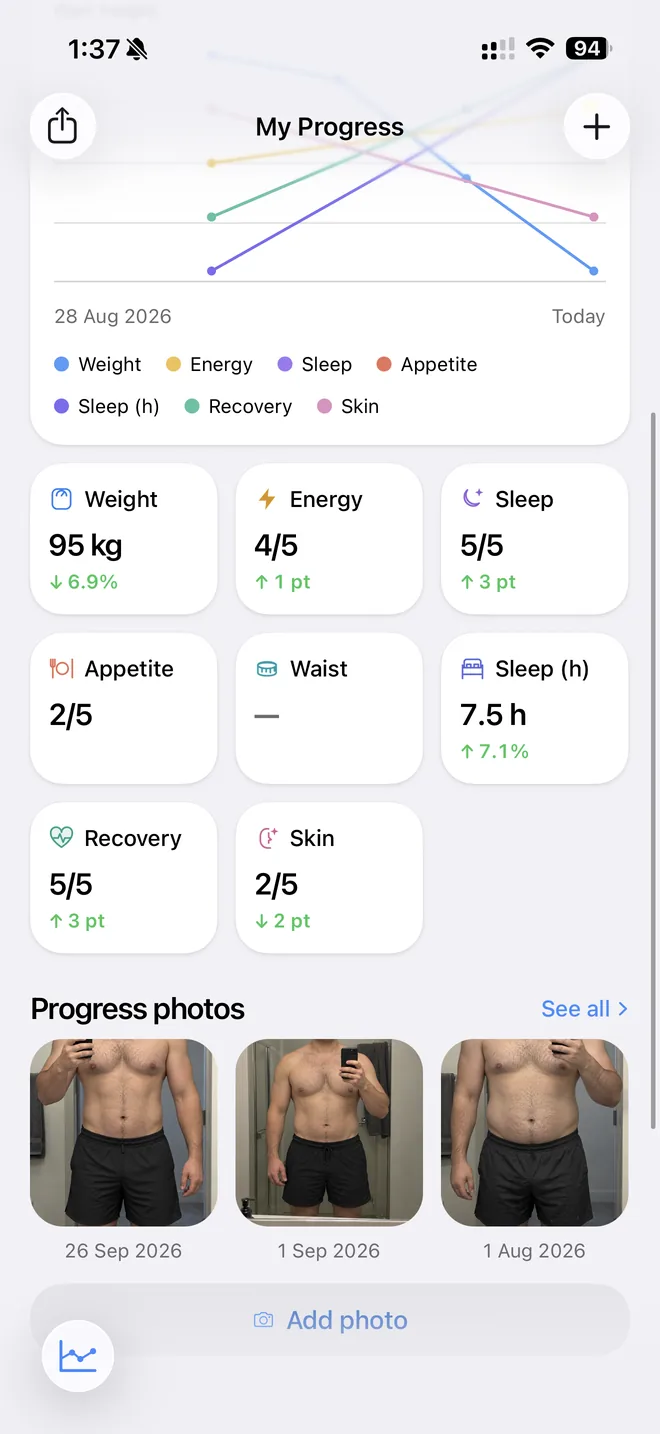

Weight, waist and sleep hours, plus 1–5 ratings for sleep quality, energy, appetite, recovery and skin dryness or irritation.
Tiles on Home show your latest values; tap one to add today's.
All your check-ins on one chart over a week, 30 days, 90 days or a year.
On a GLP-1 the scale is only part of the story. Rate appetite, energy, sleep quality and recovery from 1 to 5, each with a plain-language label, and see them move together with your weight and waist.
Describe a symptom or pick a common one, rate how much it affects you, set when it started, link it to an item in your stack if you want, and mark it resolved or ongoing.
Take or choose a photo with its date and a note. Photos are kept in private storage only your account can reach, and you can compare any two side by side at the same ratio.
Each metric compares the first and last entry in the period you pick, and says when there aren't enough entries to compare. Use kg and cm or lb and in.
More answers on the FAQ page.
Yes. Log your weight and waist, rate appetite, energy and sleep, and add progress photos. NEXA charts them over a week, 30 days, 90 days or a year.
No. NEXA doesn't read or write Apple Health data; you enter check-ins yourself.
Only you. They're kept in private storage that only your account can reach, and they're left out of reports unless you switch them on.
The schedule you were given, and a one-tap log of what you actually took.
Learn moreA PDF summary or full report, or CSV tables, for the period and items you pick.
Learn moreAnswers from your own records and the library, with sources. Off until you allow it.
Learn more