
Skip to content
NEXA
Get the app

GLP-1 & peptide tracker

Your plan and your log,kept apart and accurate.

Enter the schedule you were given, log each dose in one tap and see what you planned next to what you actually did, with an edit trail on every record.

A personal journal, not medical advice.

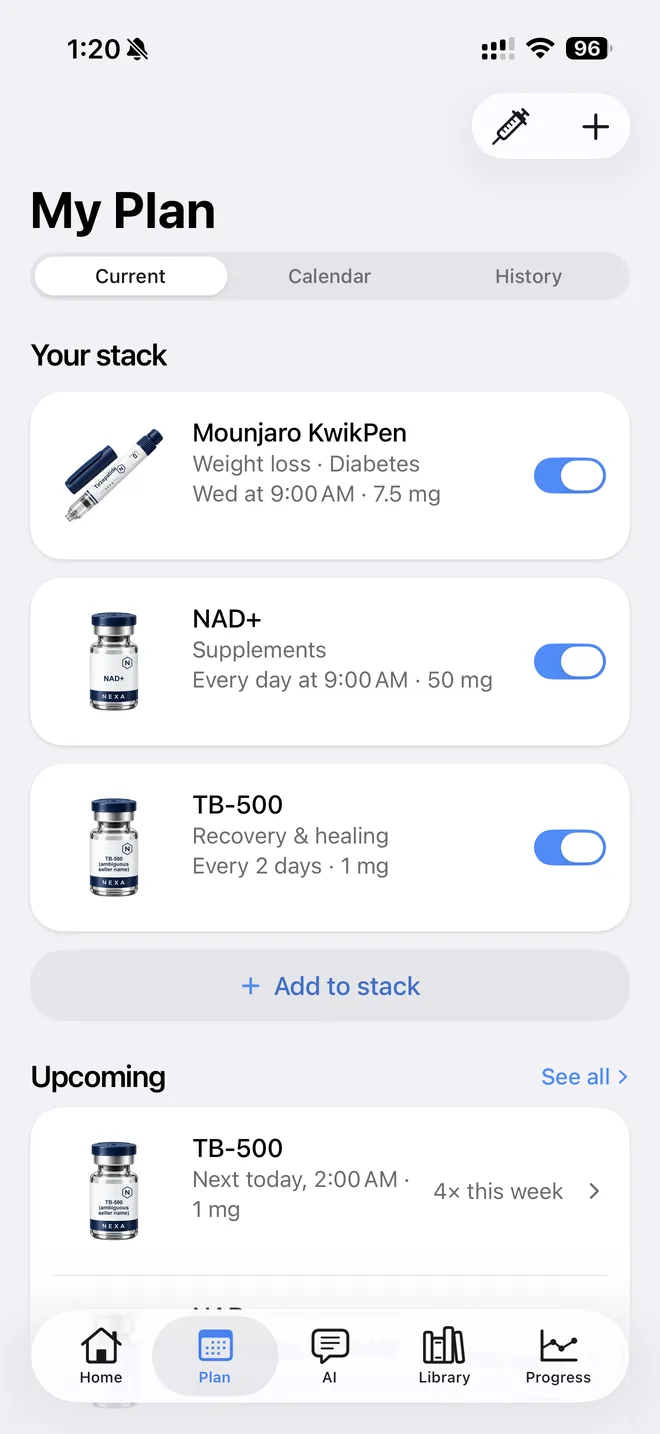
NEXA's My Plan tab: Current, Calendar and History views, your stack with each item's schedule and an on/off switch, and what's upcoming this week

How it works

  1. Add it to your stack

    Search the catalog by ingredient or brand, or type it from your label. Strength always comes from your label.

  2. Enter your schedule

    Every day, chosen weekdays, every few days or hours, or once, with start and end dates and the dose you were given.

  3. Log in one tap

    “Log dose” saves the planned time with the dose and supply from your plan. Pick another time if it was different.

  4. See plan against log

    Home, a week strip and a month calendar show what was planned and what you logged, day by day.

Built for weekly GLP-1s and daily peptides

Whether your schedule is one pen a week, a vial on chosen weekdays or a few capsules a day, NEXA keeps it as a plan: how often, at what times, from when to when and how much. A weekly injection and a daily supplement sit in the same stack, each with its own schedule and supply.

  • Every day, chosen weekdays, every few days or every few hours
  • Several times a day, start and optional end date
  • Pens, vials, tablets, capsules and oral solutions

What you meant to do, and what you did

Plans and records are separate. A passed time with no record shows as “Not logged yet”, never as taken or missed. Log it later with the real time, or mark it skipped by you, with undo. An amount you leave blank is recorded as “Dose not entered”, never as zero.

When the plan changes

Dose changes are normal, especially while a dose is stepped up. Edit a plan and the change applies from now on; earlier versions stay in its history, and older logs keep the plan they belonged to. Pause an item with one switch, then resume or end it.

A record you can trust

Each log can say how sure you are of the time: exact, within the hour, only the day, or not sure. Edits keep a revision history with a reason, and a removed log stays in the record as removed and drops out of totals and reports. A save that's retried after a dropped connection is never recorded twice.

Reminders that say nothing they shouldn't

Turn on reminders per plan. They're scheduled on your iPhone and read “Time for your planned dose”, never the name of what you take. “Mark as taken” on the notification logs that exact planned time.

Questions about tracking your doses

More answers on the FAQ page.

Yes. Add the item from your label, enter the schedule your prescriber gave you, and log each dose. NEXA records your plan and what you took; it doesn't suggest doses.

Yes. Everything you take sits in one stack, each item with its own schedule, supply and log history.

Edit the plan. The new dose applies from now on, the earlier version stays in the plan's history, and older logs keep the dose they were saved with.

No. A passed time with no record shows as “Not logged yet”. You can log it later with the real time or mark it skipped.

More in NEXA

All features